Word Embeddings in Natural Language Processing
- NLP
In NLP applications we have to work with textual data. We can’t directly feed our textual data for training into our ML models, Deep Learning models, etc. Whether it be regression, classification, or any NLP task, we need to convert our textual data into a numerical form that can be fed into models for further processing.
Word Embedding converts textual data into numerical data of some form. In general, word embedding converts a word into some sort of vector representation.
Now, we will broadly classify word embedding into 2 types and then dive deep into each type.
- Frequency based Embedding
- Count Vector
- Tf-Idf Vector
- Prediction based Embedding
- CBOW (Continuous Bag of Words)
- Skip-Gram
1. Frequency based Embedding
These are the very basic, easy and fast methods to get word vectors. These work on the basis of the count of a word in each document. It can be Count Vector, Tf-Idf Vector, or Co-Occurrence Vector. We will discuss here only Count Vector and Tf-Idf Vector.
1.1 Count Vector
Let us understand this by looking into a simple example. Let’s take two documents.
d1 = “Take a look into the beauty of the word embedding.” d2 = “The word vectorizer is the most basic word embedding”
There are 12 unique words, so here our word vector will be of size 12, which means each word can be denoted by a vector of size 12.
Let’s arrange all unique words in alphabetic order. That would be “basic, beauty, embedding, into, is, look, most, take, the, vectorizer, word”.
Now let’s prepare a dictionary where each word is mapped to an index in the vector.
{'basic': 0,'beauty': 1,'embedding': 2,'into': 3,'is': 4,'look': 5,'most': 6,'of': 7,'take': 8,'the': 9,'vectorizer': 10,'word': 11}So, suppose we want to denote a word by a vector.
vectorizer = [0, 0, 0, 0, 0, 0, 0, 0, 0, 0, 0, 1]Let’s convert both our sentences into vectors.
| basic | beauty | embedding | into | is | look | most | of | take | the | vectorizer | word | |
|---|---|---|---|---|---|---|---|---|---|---|---|---|
| d1 | 0 | 1 | 1 | 1 | 0 | 1 | 0 | 1 | 1 | 2 | 0 | 1 |
| d2 | 1 | 0 | 1 | 0 | 1 | 0 | 1 | 0 | 0 | 2 | 1 | 2 |
Above is the vector representation of documents d1 and d2.
Here is example code to form a count vector using the sci-kit learn library.
>>> from sklearn.feature_extraction.text import CountVectorizer
>>> text = ["Take a look into the beauty of the word embedding.","The word vectorizer is the most basic word embedding"]
>>> cv = CountVectorizer()
>>> cv.fit(text)
>>> text_vector = cv.transform(text)
>>> text_vector.toarray()
array([[0, 1, 1, 1, 0, 1, 0, 1, 1, 2, 0, 1],
       [1, 0, 1, 0, 1, 0, 1, 0, 0, 2, 1, 2]])
>>> cv.vocabulary_
{'basic': 0,
 'beauty': 1,
 'embedding': 2,
 'into': 3,
 'is': 4,
 'look': 5,
 'most': 6,
 'of': 7,
 'take': 8,
 'the': 9,
 'vectorizer': 10,
 'word': 11}
1.2 TF-IDF Vector
It is another method which is also based on the frequency of words in documents, but it overcomes some flaws of CountVectorizer. It takes into account not only the frequency of a word in each document but also the entire corpus.
Some words like ‘the’, ‘a’, ‘is’, ‘that’ appear more often than other words in every document. These words don’t seem to change the sentiment of a sentence. So we would like to weight down the words which occur quite often in most of the documents.
For documents,
d1 = “Take a look into the beauty of the word embedding.” d2 = “The word vectorizer is the most basic word embedding”
Let’s look at what Tf-Idf does.
TF = ( Freq of word in a document ) / ( No of words in that document )
TF(take,d1) = 1/10 = 0.1
TF(the,d2) = 1/9 = 0.11

IDF = log( No of docs / No of docs term t has appeared ) #without smoothing
where
IDF(the) = log(2/2) = 1
IDF(take) = log(2/1) = 0.6931

TF-IDF(take,d1) = tf*idf = 0.1*0.6931 = 0.0693
Sci-kit learn’s TF-IDF implementation by default takes a smoothing factor into account, so values might be different.
>>> from sklearn.feature_extraction.text import CountVectorizer
>>> text = ["Take a look into the beauty of the word embedding.","The word vectorizer is the most basic word embedding"]
>>> cv = CountVectorizer()
>>> cv.fit(text)
>>> text_vector = cv.transform(text)
>>> text_vector.toarray()
array([[0, 1, 1, 1, 0, 1, 0, 1, 1, 2, 0, 1], [1, 0, 1, 0, 1, 0, 1, 0, 0, 2, 1, 2]])
>>> cv.vocabulary_
{'basic': 0, 'beauty': 1, 'embedding': 2, 'into': 3, 'is': 4, 'look': 5, 'most': 6, 'of': 7, 'take': 8, 'the': 9, 'vectorizer': 10, 'word': 11}
Pros:
- It is a very easy and fast method to perform word embeddings.
Cons:
- If the vocabulary is too large, then the sparse matrix created will be too large and will take a lot of memory. Also, processing that huge matrix will be a burden.
2. Prediction Based Vector
To overcome the limitations of the previous methods of representation, another method is introduced which, with the help of a 1-hidden-layer neural network, forms an N-dimensional representation of a word called a word vector.
These are great for many NLP tasks like word analogies and word similarities.
They can also perform tasks like King - Man + Woman = Queen.
Let’s take a look at 2 techniques to generate word vectors.
2.1 CBOW (Continuous Bag of Words)
It works by finding or predicting the probability of a word in a given context. A context is a group of words. Given the context, we predict the target word.
We use a neural network with 1 hidden layer whose size is equal to the size of the word embedding we want.
Suppose we have a vocabulary of size V, embedding size of N, and context size of C. So the architecture of the neural network will be as follows:
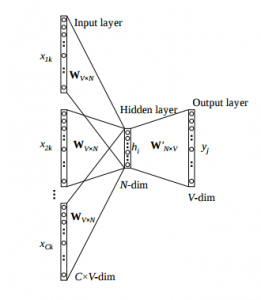
As shown in the figure above, the input layer has multiple vectors given as input. These vectors are one-hot encoded vectors. These multiple vectors belong to each word in the context. Hidden layer size is equal to the embedding size, while the output layer is a one-hot encoded target word.
Objective function is the negative log likelihood of a word, i.e. -log(p(wo/wi)) where wo is the output word and wi is the context word.
Each word is represented by a vector of size N, i.e. the hidden layer.
2.2 Skip-Gram
This is somewhat similar to CBOW; the input is the target word and the outputs are the words surrounding the target, i.e. the context. For example, in the sentence “I have a cute dog.” If the input is “cute” then the output is “I”, “have”, “a”, “dog” assuming a window size of 5.
Similar to CBOW, it contains 1 hidden layer of size equal to the embedding size.
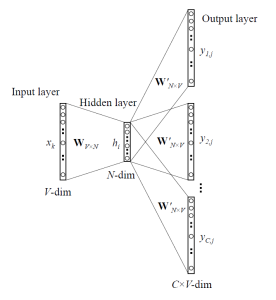
As shown in the figure above, the input layer has the target one-hot encoded word vector given as input. Hidden layer size is equal to embedding size, while the output layer is one-hot encoded context words.
Vectors are “meaningful” in terms of describing the relationship between words. The vector obtained by subtracting two related words sometimes expresses a meaningful concept such as gender or verb tense.
Pros:
- Word Vectors take less memory than previous word embedding methods.
- Word Vectors can be used to describe similarity between words using cosine similarity.
- Many libraries already exist, like Gensim, GloVe, and Spacy, which help us work with Word Vectors.
Cons:
- Training for CBOW or Skip-Gram can take a lot of processing because of large vocabulary size.
Let’s look at an example to build word vectors using the Gensim library.
import gensim.models.word2vec as w2v
import numpy as np
sentence_tokens = np.array([["This","is","a","game","of","thrones","books","corpus"],
            ["You","can","select","any","corpus"],
            ["You","must","convert","corpus","in","this","form"]])

embedding_size = 300 #size of embedding
min_word_count = 3 #word must appear atleast 3 times
num_workers = multiprocessing.cpu_count() #using multiple processors
context_size=7 #looking at 7 words at a time
downsampling = 1e-3 #Downsample setting for frequent words

thrones2vec = w2v.Word2Vec(
    sg=1, #1 skip-gram 0- CBOW
    seed=seed,
    workers= num_workers,
    size = num_features,
    min_count = min_word_count,
    window = context_size,
    sample = downsampling
)

thrones2vec.build_vocab(sentence_tokens)
#start training, this might take time
thrones2vec.train(sentence_tokens,
                  total_examples=len(sentence_tokens),
                  epochs=25
)
thrones2vec.save("thrones2vec.w2v") #to save word2vec model
thrones2vec = w2v.Word2Vec.load("thrones2vec.w2v") #to load word2vec model
Let’s look at some applications of word2vec.
>>> thrones2vec.wv.vectors #gives V*N dimensional matrix
>>> thrones2vec.wv.vocab #gives list of words of size V
>>> thrones2vec.wv.most_similar("stark")
[('eddard', 0.6009404063224792),
 ('snowbeard', 0.4654235243797302),
 ('accommodating', 0.46405118703842163),
 ('divulge', 0.4528692960739136),
 ('edrick', 0.43332362174987793),
 ('interred', 0.4253771901130676),
 ('executed', 0.42412883043289185),
 ('winterfell', 0.4224868416786194),
 ('shirei', 0.4207403063774109),
 ('absently', 0.419999361038208)]
>>> #Finding the degree of similarity between two words.
>>> thrones2vec.wv.similarity('woman','man')
0.73723527
>>> #Finding odd one out.
>>> thrones2vec.wv.doesnt_match('breakfast cereal dinner lunch'.split())
'cereal'
>>> #Amazing things like woman+king-man=queen
>>> thrones2vec.wv.most_similar(positive=['woman','king'],negative=['man'],topn=1)
queen: 0.508
>>> #Probability of a text under the model
>>> thrones2vec.wv.score(['The fox jumped over the lazy dog'.split()])
0.21
>>> def nearest_similarity_cosmul(start1, end1, end2):
.........similarities = thrones2vec.wv.most_similar_cosmul(
.........positive=[end2, start1],
.........negative=[end1])
.........start2 = similarities[0][0]
.........print("{start1} is related to {end1}, as {start2} is related to {end2}".format(**locals()))
>>> nearest_similarity_cosmul("stark", "winterfell", "riverrun")
'stark is related to winterfell, as tully is related to riverrun'
>>> nearest_similarity_cosmul("arya", "nymeria", "drogon")
'arya is related to nymeria, as dany is related to drogon'
Comments